Learn AutoCAD with our Free Tutorials
Welcome to CADTutor
CADTutor provides the best free tutorials and articles for AutoCAD, 3ds Max and associated applications along with a friendly community forum. If you need to learn AutoCAD, or you want to be more productive, you're in the right place. See our tip of the day to start learning right now!
Free Tutorials and More…
The Tutorials section provides over 100 original tutorials for AutoCAD, 3ds Max and other design applications. Michael’s Corner is an archive of productivity articles that brings you the best AutoCAD tips and tricks. Our Forum is a lively community where AutoCAD users can ask questions and get answers. The Downloads area provides free AutoCAD blocks, free AutoLISP routines and free images.
Tutorials of the Moment
Recently viewed tutorials
-
Perspectives, Slides and Scripts

AutoCAD can be used to create a simple "walk through" of any 3D model. This tutorial shows you how. Format: Text/Image
Last visited: 1 minute ago
-
Drawing Objects

Getting to grips with AutoCAD's basic drawing tools. This is an ideal start for the AutoCAD beginner. Format: Text/Image
Last visited: 3 minutes ago
-
Object Selection

This tutorial shows you the many ways AutoCAD objects can be selected. Covers the building of selection sets with implied windowing, fences etc. Format: Text/Image
Last visited: 3 minutes ago
-
Object Properties

This tutorial describes how to control the display of objects (colour, linetype etc.) using layers. It also explains what layers are and how they should be used. Format: Text/Image
Last visited: 4 minutes ago
-
All About Shadows

This tutorial considers the various options for creating shadows when rendering 3D models. Format: Text/Image
Last visited: 4 minutes ago
-
Dimensioning

This tutorial describes the options and commands available for dimensioning drawings and how to use them. The correct use of AutoCADs dimension tools is the key to producing clear and concise measured drawings. Format: Text/Image
Last visited: 4 minutes ago
CADTutor Tutorials
Our tutorials are comprehensive but straightforward introductions to AutoCAD and related software. They are designed to help beginners get to grips with design workflows as quickly as possible. There are over 100 to choose from, some text/image based and others in video format. Whatever stage you are at in your learning, you should find a tutorial to help.
Forum Latest
Currently Active Topics
MASSPROP: Tracking down an unexpected shift in a solid's centroid
by indiancad
0 replies
Last post: 2 hours ago
GitHub vs APPLOAD: Why is our global impact invisible?
by VicoWang
23 replies
Last post: 6 hours ago
Aluminum composite panels parametric templates
by emosms
5 replies
Last post: 9 hours ago
Slide Library Manager
by Paul Li
4 replies
Last post: 12 hours ago
SOLPROF: Keeping projected profiles manageable in complex assemblies
by indiancad
0 replies
Last post: 24 hours ago
PROJECTGEOMETRY: When projecting 3D edges onto an inclined face
by indiancad
0 replies
Last post: 25 hours ago
This Week's Hot Topics
Aluminum composite panels parametric templates
by emosms
5 replies
Viewed: 196 times
Fillet Polylines Multiple
by SLW210
4 replies
Viewed: 420 times
Slide Library Manager
by Paul Li
4 replies
Viewed: 155 times
LISP FOR STEEL PLATE FABRICATION
by CamDuy
3 replies
Viewed: 349 times
Generated ISO title block DXF: units, attributes and fonts when used in a template
by Margo App
2 replies
Viewed: 208 times
SOLIDEDIT: How do you handle a face that refuses to offset cleanly?
by indiancad
2 replies
Viewed: 186 times
CADTutor Forums
Our forum is a vibrant community of experts and beginners. The main focus is helping beginners get to grips with AutoCAD and to help more advanced users become more productive. The AutoLISP forum is one of the busiest out there, providing expert advice for busy professionals.
AutoCAD Productivity
Layer Previous
From: AutoCAD Productivity Articles #132
Originally published: February 2014
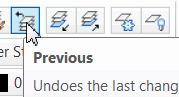 Layers are the lifeblood in AutoCAD, and efficient management thereof is the key to your own quality of life; specifically, your sanity.
The Layer Previous button can be a real time saver and is, at its core, a Layer-specific ‘Undo’.
How to Use Layer Previous
Open a drawing, then make a new layer [MC_FEB2014], give it a color and make it current; this will be our testing layer.
Change the Color of any other layer in the current drawing, but don't make that layer current.
On our test layer, draw a small rectangle somewhere.
Click Layer Previous and the rectangle remains, but the color of the layer you changed is restored.
Freeze several existing layers, then Rotate the rectangle.
Click Layer Previous and the previously frozen layers are thawed… but the rectangle is still rotated!
See all the articles published in February 2014
Michael's Corner
Between 2003 and 2016, Michael Beall (and one or two guests) wrote almost 600 articles for CADTutor. The focus of these articles is AutoCAD productivity, and although some of them are now more than a few years old, most remain relevant to current versions of AutoCAD. The article above is just one example. Check out Michael's Corner for a full listing.
Image of the Week
-
26th October to 1st November 2026

This week's image is by shift1313
Software used: SolidWorks 2010
-
Last Week's Image

Last week's image is by Oppie
Software used: AutoCAD 2011
-
Two Weeks Ago
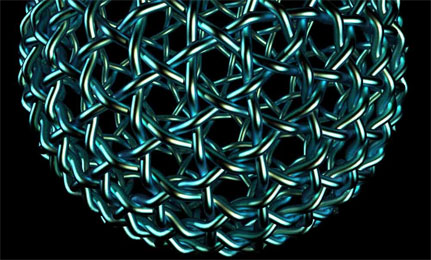
This image is by boofredlay
Software used: SketchUp and Twilight Render
-
Three Weeks Ago

This image is by mitchellrodhous
Software used: AutoCAD 2011
Gallery of Work
Over the years, our forum members have contributed hundreds of images, showcasing their amazing work. The images above are just a small selection that demonstrate the wide range of project types our community is involved with. Take a look at our gallery to see all the images published in the last 12 months.
Tip of the Day
Mid Between 2 Points (m2p)
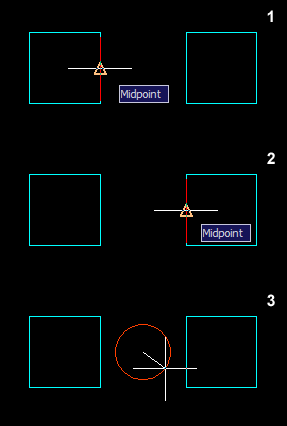 Sometimes you might want to find a point midway between two other points. In the past, you might have drawn a line between these two points and then used "Snap to Midpoint" but this requires the drawing of a construction line and isn't very efficient.
Enter the m2p object snap. This will find the midpoint between any two picked points without the need for a construction line.
How it works: Say you want to draw a circle midway between two squares, start the circle command and then enter "m2p" when prompted to specify the center point. Now just follow the prompts.
Command: circle
Specify center point for circle or [3P/2P/Ttr (tan tan radius)]: m2p
First point of mid: (pick first point)
Second point of mid: (pick second point)
Specify radius of circle or [Diameter] <20.000>: (pick to complete circle)
Missed a Tip?
Did you miss yesterday's tip? Maybe you forgot to drop by or maybe you don't visit over the weekend. If so, you can now see all the tips published during the past week. Also, if you have a tip you'd like to share with us, you can post it on our forum and if we like it, we'll publish it here.