All Activity
- Past hour
-

Logic Issue: CENTERLINE Command Redefined with Layer Change
BIGAL replied to Clint's topic in AutoLISP, Visual LISP & DCL
I am like others as suggested dont use a command word, as your wanting to use a defun then why not just call the defun something shorter, like CENTL.You can use AUTOLOAD to load the actual lisp at the first time you type centl. You would put the "Autoload" in say a custom lisp that is loaded on startup, along with your other AUTOLOAD's (autoload "CENTL" '("CENTL")) (autoload "COPY0" '("COPY0")) (autoload "COPYCOMMAND" '("ZZZ")) (autoload "COVER" '("COVER")) -
Confused by scale issue when set to 1:1_1
BIGAL replied to Bob658's topic in AutoCAD 2D Drafting, Object Properties & Interface
Need some more info, are you talking about plotting settings, we worked in metres, and when plotting just set the 1 printed unit = 1 drawing units, our title block was a A1 and if you checked the size of the title block in a layout it was 641x594. For A3 did 1 print = 2 drawing. Or is it annotation scaling ? -
Small dot appears near MTEXT and cannot be deleted
BIGAL replied to CHAKRADHAR's topic in AutoCAD 2D Drafting, Object Properties & Interface
When asked for a sample dwg you can often use WBLOCK to save a little bit of a dwg into a new dwg, like your text. Then it's not a company copyright problem. -
Lisp exportar todas las presentaciones
BIGAL replied to mikarts's topic in AutoLISP, Visual LISP & DCL
Added the "-" to file name, code updated above.
-
quick xyz coordinates text placed from selected points
BIGAL replied to pavanetc's topic in AutoLISP, Visual LISP & DCL
@Saxlle just a suggestion as the "Points' may not be just that a Autocad "Point" often they are a block. (setq ss (ssget (list (cons 0 "POINT"))) len (sslength ss) x_spacing 1 i 0 ) (while (< i len) (setq ss (ssget (list (cons 0 "POINT"))) (if (= ss nil) (progn (alert "You have not selected any Points \nWill now exit please check objects ") (exit) ) ) (setq len (sslength ss) x_spacing 1 i 0 ) (repeat len -
 El_Che_12345678 joined the community
 - Today
-

Penn Foster Student Suffering with Oleson Village Map!!!
007 replied to AutoCad Student's topic in Student Project Questions
Thank you for your kind words. Someday P-F might get their act together and address the problems with their project instructions and their so-called instructors. Good luck in your endeavors now and in the future. -
For Key maps, I use two routines: 1. Lee's Viewport outline https://lee-mac.com/vpoutline.html 2. Change Space Copy (defun c:CHSpaceCopy (/ ss2 ss i) (vl-load-com) (if (setq ss2 (ssadd) ss (ssget "_:L") ) (progn (repeat (setq i (sslength ss)) (ssadd (vlax-vla-object->ename (vla-copy (vlax-ename->vla-object (ssname ss (setq i (1- i)))) ) ) ss2 ) ) (vl-cmdf "_.chspace" ss2 "") ) ) (princ) )
-

Penn Foster Student Suffering with Oleson Village Map!!!
EmeraldSynth replied to AutoCad Student's topic in Student Project Questions
Got it. And thank you all that you did to help others over the years. Even though it's been 12 years, , it's still helping me and I'm sure others too. PF sure hasn't given us the resources we need, along with confusing instructions. But at least they have made changes to things. So many thanks! -

Penn Foster Student Suffering with Oleson Village Map!!!
ReMark replied to AutoCad Student's topic in Student Project Questions
Re: Bar scale construction. I used the Rectangle, Line and Hatch commands. Yes, the scale is for the whole subdivision drawing. The correct scale for the title block and border is 50 and not 58. Re: Lot lines. I used the supplied property line dimensions as provided in the instructions. -

quick xyz coordinates text placed from selected points
SLW210 replied to pavanetc's topic in AutoLISP, Visual LISP & DCL
Why did you report my post? It was meant for an example for you to learn to help yourself. Do you even know what you want? Your first example drawing doesn't show XYZ for the "NEED SOMETHING LIKE AT ALL POINT". Not sure why you want someone to do a bunch of work for you for free and you can't be bothered to provide a well though out request and provide appropriate examples and comments. -

quick xyz coordinates text placed from selected points
Saxlle replied to pavanetc's topic in AutoLISP, Visual LISP & DCL
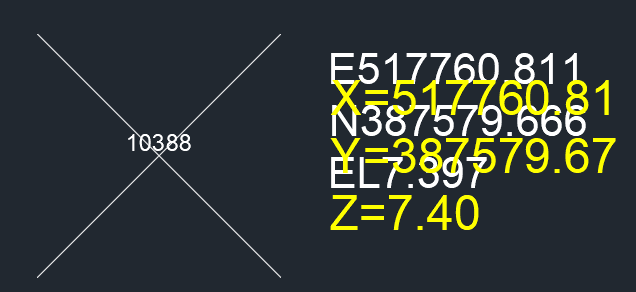
@pavanetc I hope this is what you want to accomplish. Try this code: (prompt "\nTo run a LISP type: XYZTEXT") (princ) (defun c:XYZTEXT ( / old_osmode ss len x_spacing i pt) (setq old_osmode (getvar 'osmode)) (setvar 'osmode 0) (if (not (tblsearch "LAYER" "Coor Text")) (command-s "-layer" "m" "Coor Text" "c" 7 "" "") (setvar 'clayer "Coor Text") ) (prompt "\nSelect the POINTS:") (princ) (setq ss (ssget (list (cons 0 "POINT"))) len (sslength ss) x_spacing 1 i 0 ) (while (< i len) (setq pt (strcat "X=" (rtos (cadr (assoc 10 (entget (ssname ss i)))) 2 2) "\n" "Y=" (rtos (caddr (assoc 10 (entget (ssname ss i)))) 2 2) "\n" "Z=" (rtos (cadddr (assoc 10 (entget (ssname ss i)))) 2 2))) (entmake (list (cons 0 "MTEXT") (cons 100 "AcDbEntity") (cons 100 "AcDbMText") (cons 10 (list (+ (cadr (assoc 10 (entget (ssname ss i)))) x_spacing) (caddr (assoc 10 (entget (ssname ss i)))) (cadddr (assoc 10 (entget (ssname ss i)))))) (cons 1 pt) (cons 40 0.20) (cons 50 0) (cons 71 4))) (setq i (1+ i)) ) (setvar 'osmode old_osmode) (prompt "\nThe X, Y and Z values were added near the points!") (princ) ) You will get something like this from picture below (the yellow XYZ values is what you will get, the white text behind the yellow is your's). Best regards.
-

Cleaning up the file
CyberAngel replied to Discus84's topic in AutoCAD 2D Drafting, Object Properties & Interface
But just in case you are using Civil, try to prune out as many points as you can. They take up approximately 1K apiece. One thousand points = 1MB of space. It adds up. -
Penn Foster Student Suffering with Oleson Village Map!!!
EmeraldSynth replied to AutoCad Student's topic in Student Project Questions
Somehow I erased some of my lines... How did you come up with the radius for the circles on Lots 5 and 6? -

quick xyz coordinates text placed from selected points
pavanetc replied to pavanetc's topic in AutoLISP, Visual LISP & DCL
sorry engineers. I am posting this again to clarify my exact requirement. Please check the attached DWG file. The text placement location may be at the top, bottom, or canter, but it must be positioned close to the points and without arrows. I need the XYZ coordinates for all points displayed in a single SHOT Thanks for your time SAMPLE 2.dwg -
 1958uz joined the community
 -
Cleaning up the file
SLW210 replied to Discus84's topic in AutoCAD 2D Drafting, Object Properties & Interface
That is only available in Civil 3D AFAIK, not much use for someone with AutoCAD 2010. -
quick xyz coordinates text placed from selected points
SLW210 replied to pavanetc's topic in AutoLISP, Visual LISP & DCL
Maybe something in this thread will help. REQUIRE LISP 3-IN-1 FOR (XYZ COORDINATES WITH LEADER) - AutoLISP, Visual LISP & DCL - AutoCAD Forums -

quick xyz coordinates text placed from selected points
Steven P replied to pavanetc's topic in AutoLISP, Visual LISP & DCL
Not quite sure what the question is to be 'exactly like 2' - is it the text to be offset to one side? (only difference I can see really), else EnM4st3r works for me. If you want to offset the text from the selected point, use the mapcar function, have a go at changing the code offered perhaps changing this line (vla-addmtext (vla-get-modelspace (vla-get-activedocument (vlax-get-acad-object))) (vlax-3d-point pt) 0 str) use (mapcar '+ '(x y z) pt) instead of pt where x, y and z are the offset distances (numbers) in each direction Hint with LISPs, 'pt' or very similar is often used as a variable for a point, you can check earlier in the code to confirm, getpoint is the LISP command to return a selected point, pt is set to be the output from getpoint... so a good guess would be this is the point to change Have a go, your first steps to write LISPs is to try, if it all goes wrong ask and we are all more than happy to guide you if you are happy to change things yourself. -

quick xyz coordinates text placed from selected points
EnM4st3r replied to pavanetc's topic in AutoLISP, Visual LISP & DCL
@pavanetc he meant for you to try it yourself. since its not that difficult. Just look into ssget and selectionset looping -
quick xyz coordinates text placed from selected points
pavanetc replied to pavanetc's topic in AutoLISP, Visual LISP & DCL
Thank you for your time, i'm waiting for updated -

Lisp exportar todas las presentaciones
ivaj replied to mikarts's topic in AutoLISP, Visual LISP & DCL
Buenos días BIGAL, pero siento decirte, que no te entiendo, pero te mando un fichero para que veas lo que tengo. Cuando ejecutas la rutina de "BIGAL", funciona perfectamente, pero me haría falta solo colocar un "-" entre el nombre del fichero dwg y la presentación (sin tener que colocar en el nombre del fichero de dwg un guion). Como te he comentado anteriormente, muchas gracias TOMO001.dwg -
Lisp exportar todas las presentaciones
BIGAL replied to mikarts's topic in AutoLISP, Visual LISP & DCL
The error SET only occurs when the SETQ is missing a "q" its ok in the code I posted. I added a go to paperspace in case that is a problem. -

How to make a viewport show up through image in paper space
EleenD03 replied to chelsea.graham's topic in AutoCAD General
That's a tricky one! CyberAngel’s suggestion of using a third 'plotting' drawing is probably the cleanest way to handle this. By Xrefing both the existing plans and the new design into one file, you can easily tweak the draw order and transparency of the 'existing' layers without affecting the original files. It saves you from having to mess with viewport transparency settings that usually don't plot the way you want them to. -
Lisp exportar todas las presentaciones
ivaj replied to mikarts's topic in AutoLISP, Visual LISP & DCL
Buenos días BIGAL, siento molestarte de nuevo, no funciona pues sale esto a la hora de cargar. Comando: _appload LAYOUTS 02.lsp correctamente cargado(s). LAYOUTS 02.lsp correctamente cargado(s). Comando: ; error: no function definition: CONJUNTO Comando: ; error: no function definition: CONJUNTO. A mi me funciona perfectamente lo que puso el compañero "DEVITG", lo único que me hace falta es que me ponga en medio del nombre del fichero de autocad y el nombre de la presentación un "-". Siento mucho las molestias -
 SimonRIdge joined the community
 -
quick xyz coordinates text placed from selected points
BIGAL replied to pavanetc's topic in AutoLISP, Visual LISP & DCL
If the points are not to be moved @EnM4st3r has given you an answer, a little homework for you is a lisp task, change the (while to use a Selection set and a (repeat then all done. -
Snap and Grid set to what and are they on ?